How to Make a Resume in 2026 [Step-by-Step Guide]

Want to land more interviews in 2026? It all starts with a resume that’s not just well-written—but strategically built to pass both hiring managers and applicant tracking systems (ATS).
In this guide, you’ll learn how to write a modern, professional resume step-by-step—whether you’re starting from scratch or refreshing an old one.
Key Takeaways:
- In 2026, a successful resume must be ATS-friendly, keyword-optimized, and tailored to each job.
- Choose the right resume format and highlight measurable achievements, relevant skills, and a strong summary.
- Use clean formatting, standard headings, and thorough proofreading to pass ATS scans and impress recruiters.
Preparing to write a resume
Before you start writing a resume, you need to figure out what content you want to include, how, and why you will include it. So, don’t skip these three steps before writing your resume:
- Gather your content: The first step in the resume preparation process is to collect your content. First, sit down, brainstorm, and write down your accomplishments, experiences, activities, and skills.
- Do your research: Researching is the key to success. By researching a company before you apply, you’ll be able to tailor your resume to fit exactly what they seek in a potential candidate.
- Create an outline: Creating a rough resume outline will help you stay on track and organize your content logically.
Once you’ve gathered your content, researched the company, and created a roadmap for your resume, you’re ready to start writing.
How to make a professional resume
Follow these steps to help you craft a compelling resume that stands out:
- Step 1: Choose the right resume format
- Step 2: Include your name and contact details
- Step 3: Create a powerful resume headline
- Step 4: Write a strong resume summary or objective
- Step 5: Showcase your work experience effectively
- Step 6: Highlight key skills and industry-relevant keywords
- Step 7: List your education and certifications
- Step 8: Optimize your resume for the job and ATS
- Step 9: Proofread and refine before submitting
Step 1: Choose the right resume format
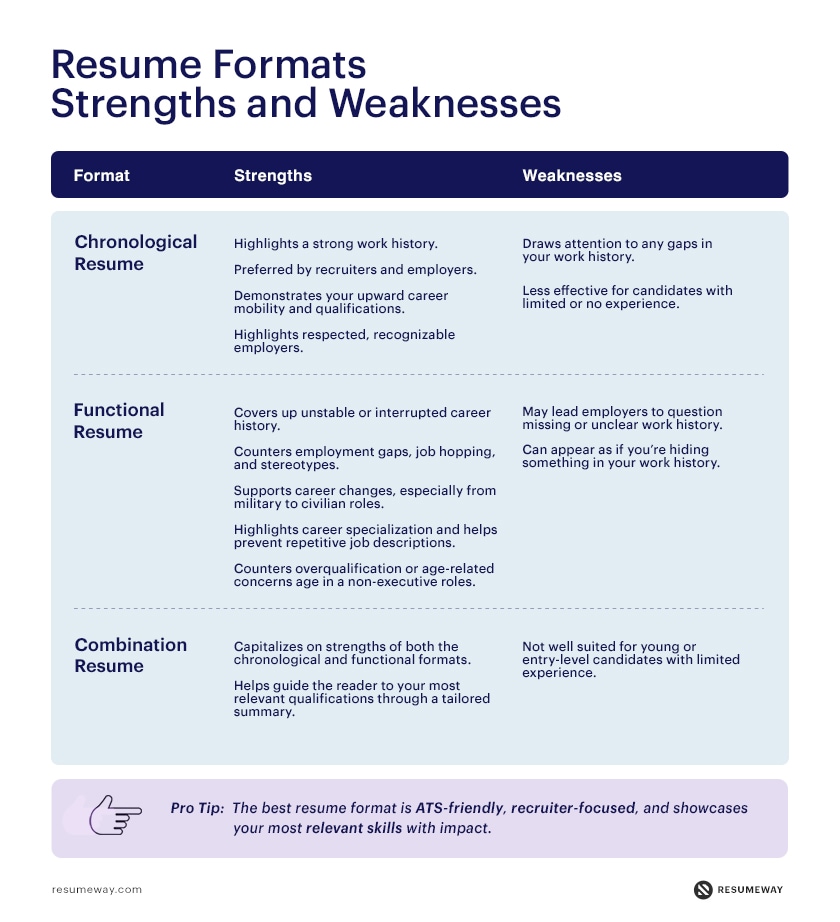
Choosing the right resume format is a crucial first step in showcasing your skills and experiences effectively. Each format has unique strengths and weaknesses, making it suitable for different types of candidates and career stages. Here’s an expanded look at the three primary formats:
Reverse Chronological Resume Format
- Strengths: Highlights a clear career progression, making it ideal for candidates with consistent work history.
- Weaknesses: Gaps in employment or frequent job changes are more noticeable.
- Best For: Professionals with a strong, linear career path in a specific industry.
Functional Resume Format (Skills-Based)
- Strengths: Focuses on skills rather than work history, making it ideal for career changers or recent graduates.
- Weaknesses: May not pass ATS screenings if skills aren’t properly aligned with job descriptions.
- Best For: Entry-level applicants, career changers, or those with non-linear work histories.
Combination Resume Format (Hybrid)
- Strengths: Combines the best features of chronological and functional formats by showcasing both skills and a detailed work history.
- Weaknesses: Can become lengthy or cluttered if not carefully organized.
- Best For: Professionals with extensive experience across different industries or those seeking roles requiring a multidisciplinary skill set.
Tip: Recruiters consistently reject resumes with functional formats when they lack clear work history, especially for mid-level and senior roles. In our experience, reverse-chronological and combination formats perform best across most industries.
Read more: What’s the Best Resume Format for 2025? Pros vs Cons.
Step 2: Include your name and contact details
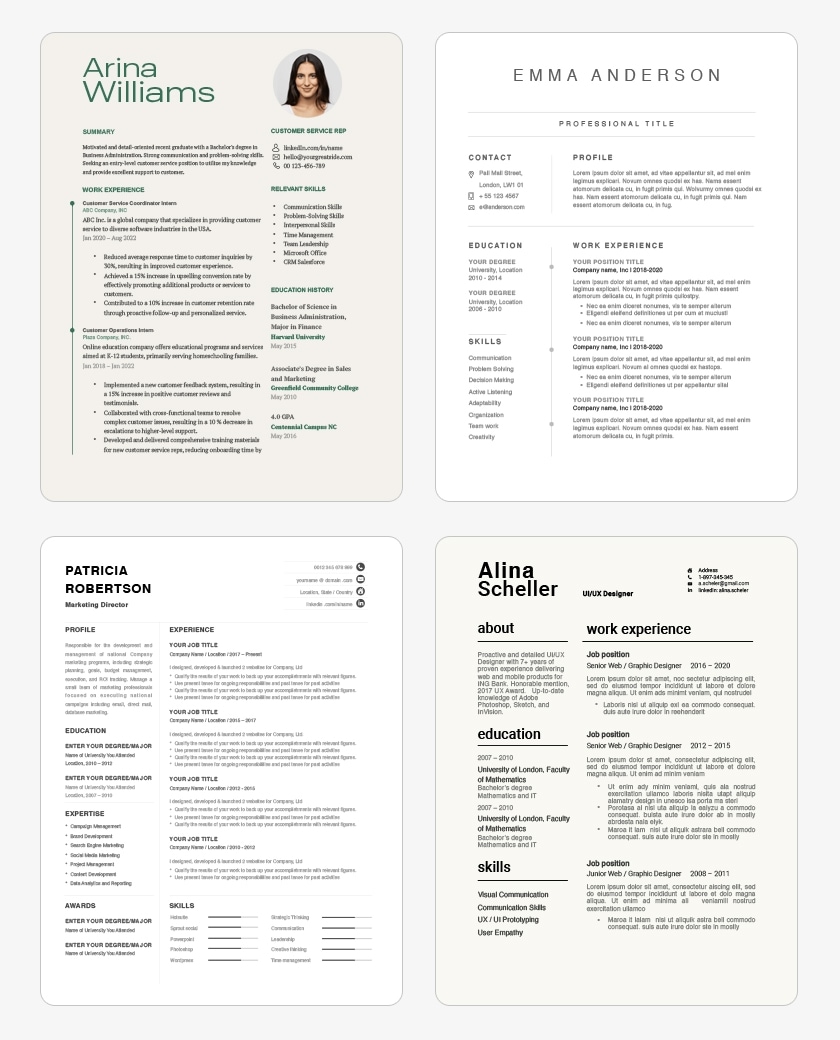
Your contact information is crucial for employers to easily identify and reach you. Make sure your name stands out by increasing the font size and using bold or italics. Double-check that your phone number and email are correct and professional. Avoid using unprofessional email addresses, and ensure your voicemail greeting aligns with your professional image.
While a physical address is optional, you can include it if you’re applying locally, as some employers prefer candidates who are nearby. Here’s what to include:
- Name (make it prominent)
- Professional email address (e.g., [email protected])
- Phone number
Optional additions:
- LinkedIn profile or online portfolio (if relevant)
- Mailing address (if local to the company)
- Resume headline (a short description of your experience or skills)
These details help employers quickly connect with you and ensure you present a professional image from the start.

Step 3: Create a powerful resume headline
A well-written resume headline should pique a recruiter’s interest and entice them to read more.
Your headline is a brief but impactful addition to your resume, and it can be the first thing a hiring manager reads. It’s also another chance to mention a particular job title or keyword that the ATS could use to filter your resume. Thus, include keywords from the job description, preferably the job title. Also, keep the headline brief, aiming for less than ten words. Use a title case and a bold or bigger font to make the headline stand out.
- “Customer Service Representative with 5 Years of Call Center Experience”
- “Experienced Content Writer Specialising in SEO”
- “Award-Winning Graphics Programmer”
- “Seasoned Sales Professional With 9 Years of Experience”
Read more: 20+ Resume Headline Examples: Stand Out from the Crowd
Step 4: Write a strong resume summary or objective
At the start of your resume, a resume introduction delivers a short overview of your experience, abilities, and credentials. Your introduction should be three to five sentences long, written in either sentences or bullet points.
Resume Objective
A resume objective presents your career goals and how they fit in with the company’s objectives. As such, they are best for applicants who have just graduated and have no professional experience or those who are changing careers.
The objective statement informs the employer of three main points:
- the sort of employment the applicant is seeking (internship or full-time)
- their availability
- the field or industry in which they are interested in and qualified for.
If possible, aim to tailor each objective statement to a particular job description. Generally, try to limit the objective to a single sentence that targets the company’s values and mission as well as your professional interests.
Resume Summary
A resume summary, on the other hand, emphasizes your most notable professional accomplishments and talents. It is thus most appropriate for individuals who have relevant experience and achievements.

“Degree-qualified board and senior-level secretary and administrative assistant with 10+ years of challenging experience at this level. I have strongly developed organization skills and became a resourceful problem solver by spending many years working to immovable deadlines.”
Read more: Resume Objective Examples for 2025 [+How-to Guide]
Step 5: Showcase your work experience effectively
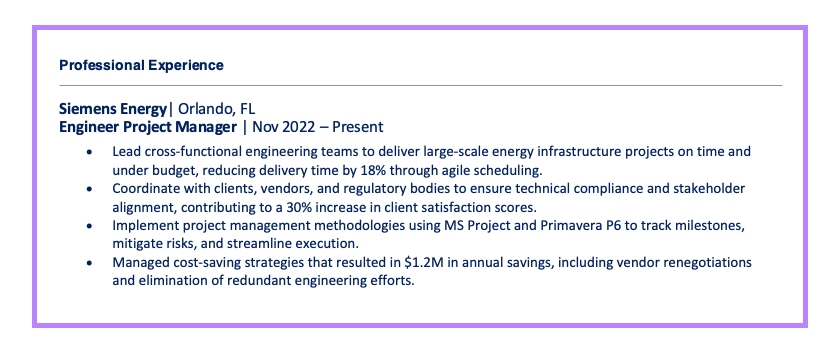
Your work experience is the heart of your resume, showcasing how you’ve applied and honed your skills in professional settings. Each role should have 3–5 bullet points, focusing on measurable achievements rather than duties. Here’s how to structure and optimize it for clarity and impact:
Key Elements to Include:
- Job Title:
Place your job title prominently at the top of each entry. This instantly informs the hiring manager of your role and expertise. - Company Name and Brief Description:
Include the employer’s name and location. If the company isn’t widely recognized, provide a brief introduction to give context (e.g., “A leading commercial real estate firm specializing in urban properties”). - Key Achievements and Responsibilities:
Focus on results-driven accomplishments that highlight your contributions. Use bullet points and action verbs to make this section easy to read and engaging. - Employment Dates:
Specify the duration of your employment using the mm/yyyy format, which is ATS-friendly and widely understood by recruiters.
Example:
MANAGING ADMINISTRATORLMV Realty | Lima, Peru
2014 – Present
LMV Realty is a premier real estate company specializing in commercial and residential properties across Peru.
- Streamlined Operations: Administered office functions and provided secretarial support to 5 executives, improving team efficiency.
- Client Engagement: Prepared and presented monthly reports for 13 key clients, leading to increased client retention rates.
- Cost Savings: Researched and qualified potential clients, reducing the marketing budget by 16%.
- Process Improvement: Prepared contracts, supported agents, and ensured timely project progress, accelerating deal closures by 10%.
Read more: How to Write Work Experience on a Resume: Examples & Tips
Step 6: Highlight key skills and industry-relevant keywords
Keywords describe the knowledge, understanding, or skills that prove you can perform a task or job. They can appear as nouns, phrases, adjectives, or even action verbs.
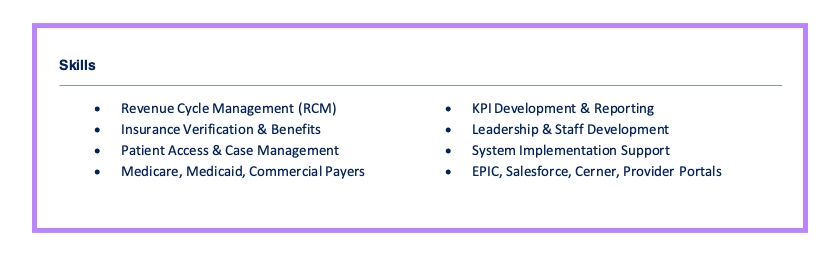
Including the right skills and keywords is essential to make your resume stand out and pass through Applicant Tracking Systems (ATS). Keywords show that you have the knowledge and skills necessary for the job. These can include:
- job titles
- responsibilities
- competencies
- certifications
- or specific abilities like coding languages
To identify relevant keywords, review the job description for frequently mentioned skills or requirements. The more specific the keyword (like “JavaScript” or “Project Management”), the better your chances are of catching the recruiter’s eye. ATS often score resumes based on these terms, so it’s critical to include role-specific hard skills and keywords throughout your resume, starting with your headline (job title).
In addition to job-specific skills, consider including any unique abilities that set you apart, such as foreign languages, technical expertise, or certifications. Tailoring your resume to each job description ensures it aligns with the recruiter’s needs and improves your chances of getting noticed.
Read more: Best Skills to Put on Your Resume in 2025 (With Examples)
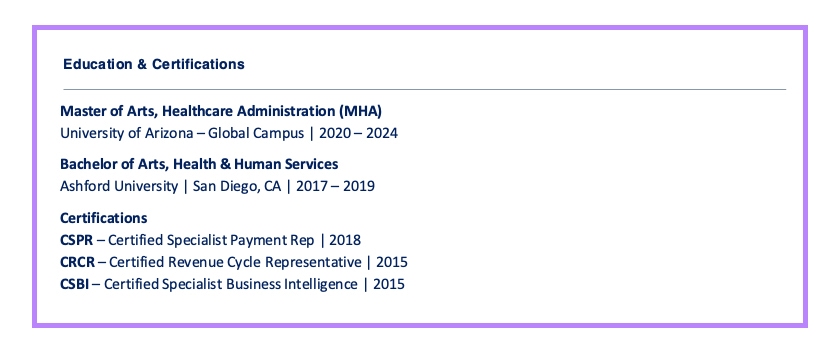
Step 7: List your education and certifications
Your education section is a key component of your resume, especially if you’re a recent graduate or applying for a role where specific qualifications are mandatory. Adding examples, much like the Work Experience section, can enhance clarity and provide a practical guide for formatting. Here’s how to structure this section and examples to illustrate:
What to Include:
- Degree or Certification: The title of your degree or certification.
- Institution: Name and location of the school or organization.
- Dates: Graduation or completion dates (if within the past 15 years).
- GPA: If higher than 3.5, include it.
- Honors and Coursework: Relevant academic achievements or courses that add value to your application.
Example #1: Recent Graduates
Bachelor of Science in Computer Science
University of California, Los Angeles (UCLA) – Los Angeles, CA
Graduated: May 2023</em>
- Relevant Coursework: Data Structures, Machine Learning, Software Engineering
- GPA: 3.8
Example #2: For Professionals Highlighting Advanced Degrees
Master of Business Administration (MBA)
Harvard Business School – Cambridge, MA
Graduated: June 2018
- Honors: Graduated with Distinction
- Capstone Project: Developed a market-entry strategy for a fintech startup, later implemented by the client.
Step 8: Optimize your resume for the job and ATS
Applicant Tracking Systems (ATS) are widely used by employers to streamline the initial stages of hiring by scanning and sorting resumes. While navigating an ATS might sound daunting, it’s straightforward with the right strategy.
Customizing your resume ensures it aligns with the specific role you’re applying for. It highlights your most relevant qualifications, helps you pass ATS scans, and grabs the attention of hiring managers.
Steps to Tailor Your Resume Effectively:
1. Incorporate Relevant Keywords
Reflect the exact language and keywords used in the job description throughout your resume. For example:
Job Description Keywords for Sales Manager Role:
- 5+ years of B2B sales experience
- Networking and relationship-building
- Increasing company revenue by 8% in the first 3 months
Optimized Resume Entry:
- “Achieved an 8% revenue increase within the first 3 months of tenure by leveraging B2B sales strategies and relationship-building expertise.”
Make sure all keywords you use are truthful and relevant to your actual experience.
2. Customize Key Sections
- Professional Summary: Rewrite this section to emphasize the specific skills or achievements that match the job’s requirements.
- Work Experience: Highlight experiences and accomplishments directly related to the role.
- Skills: Use the same terminology as the job posting for technical or soft skills, ensuring they reflect your expertise.
3. Ensure ATS-Friendly Formatting
- Use standard section headings like “Work Experience” or “Skills” for easy parsing.
- Avoid intricate designs, images, or columns that might confuse the ATS.
- Submit in formats like .docx or ATS-compliant PDFs.
While tailoring your resume, think beyond the ATS. A customized resume not only passes the software check but also resonates with the hiring manager by demonstrating your attention to detail and genuine interest in the role.
Related: How to Write a Resume With No Work Experience
Step 9: Proofread and refine before submitting
Before sending out your resume, a thorough review is essential to ensure clarity, professionalism, and error-free content. A well-polished resume not only showcases your attention to detail but also increases your chances of making a strong impression.
- Use Built-In Spellcheck Tools
Most word processors like Microsoft Word, Google Docs, and Apple Pages have built-in spellcheck features. Enable automatic spell and grammar checks to catch errors as you type. - Leverage Online Grammar & Style Checkers
Use AI-powered tools to refine clarity, readability, and tone: Grammarly (for grammar, punctuation, and style suggestions), Hemingway Editor (to improve readability and remove complex phrasing), ProWritingAid (for in-depth writing analysis and professional tone). - Print and Review a Hard Copy
Sometimes, reviewing a physical copy can help spot errors that might be missed on-screen.
Read more: How to Fix Your Resume: Tips Before Applying for a Job [2025]
FAQ
What does a good resume look like in 2026?
A good resume in 2026 is clean, concise, and optimized for both applicant tracking systems (ATS) and human readers. It uses a simple layout, clear headings, role-specific keywords, and measurable achievements. A strong professional summary, relevant skills, and results-focused work experience are essential.
How long should a resume be in 2026?
In 2026, a resume should be one page for entry-level candidates and up to two pages for experienced professionals. Recruiters typically scan resumes in under 10 seconds, so brevity, relevance, and clear formatting matter more than length alone.
What resume format do employers prefer?
Most employers prefer the reverse-chronological resume format because it clearly shows work history, career progression, and recent experience. This format is also the most ATS-friendly. A combination resume can work well for career changers or senior professionals who want to highlight both skills and experience, while functional resumes are generally discouraged by recruiters.
How do you make a resume ATS-friendly?
To make a resume ATS-friendly, use standard section headings, simple fonts, and keywords from the job description. Avoid graphics, tables, columns, and images. Save your resume as a .Docx or ATS-compatible PDF, and ensure all information is clearly readable by parsing software.
What skills should you put on a resume?
You should include job-specific hard skills and relevant soft skills that match the job description. Focus on technical abilities, tools, certifications, and transferable skills that directly support the role. Prioritize skills mentioned in the job posting to improve ATS matching.
Do resumes still need a summary?
Yes, resumes still benefit from a professional summary in 2026—especially for experienced candidates. A resume summary quickly highlights your value, experience, and key achievements. Entry-level candidates may use a resume objective instead to explain career goals and motivation.
Is it better to submit a resume as PDF or Word?
A PDF is generally best because it preserves formatting across devices. However, if an employer specifically requests a Word document, submit a .Docx file. Always follow application instructions, as some ATS systems prefer Word files.
What are the biggest resume mistakes to avoid?
The biggest resume mistakes to avoid include using generic or unedited AI content, failing to tailor the resume to the job, keyword stuffing, poor formatting, spelling errors, and listing responsibilities instead of measurable achievements. These mistakes often cause resumes to be rejected by ATS or overlooked by recruiters.
Popular related posts:
- Cover Letter Format: A Step by Step Guide for 2025
- How to List Professional References on a Resume
- Strengths and Weaknesses for Job Interviews [Great Answers]
- 15 Best Skills for a Resume (With Examples)
- Thank You Email After Interview: Examples, Dos, and Don’ts
 Privacy Protected
Get a Free Expert Resume Review
file here or click to upload
Thank You