Chronological Resume Format: Guide & Examples 2026
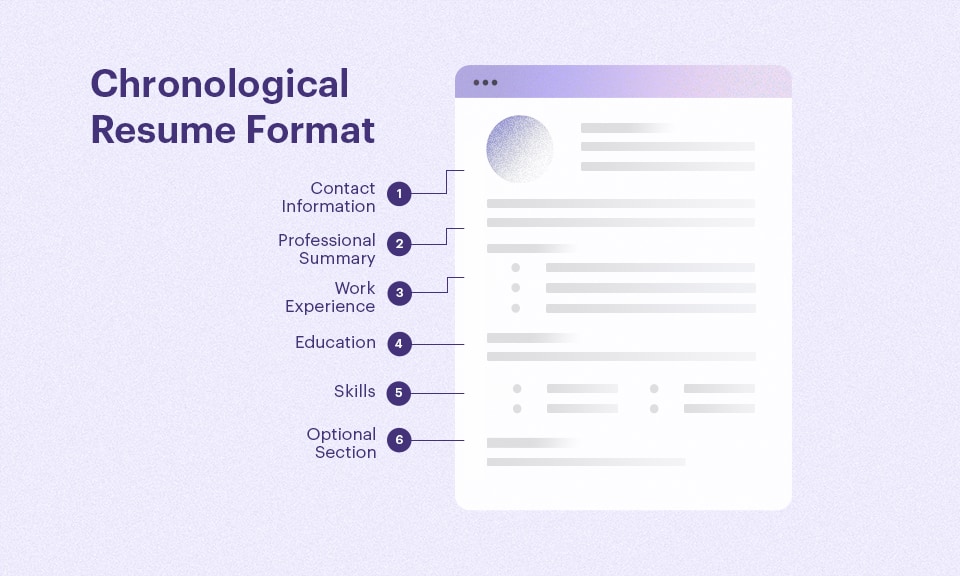
Most resumes fail in seconds—not because of lack of experience, but because of poor structure. If your work history isn’t clear, recruiters won’t dig deeper.
The chronological resume format solves this by putting your most relevant experience front and center, making it easy for both recruiters and ATS systems to scan, understand, and rank your resume.
In real hiring scenarios, the chronological resume format consistently outperforms other formats because it reduces friction—making it easier for recruiters to quickly validate experience, progression, and impact.
In this guide, you’ll learn exactly when to use it, how to structure it, and how to turn your experience into measurable, job-winning results.
Key Takeaways
- The Chronological Resume Format lists your work experience in reverse order (most recent first)
- Best for candidates with steady career growth and relevant experience
- Preferred by recruiters and ATS systems due to its clear structure
- Focus on achievements, not responsibilities (use metrics)
- Not ideal if you have career gaps or are switching industries
- Easy to write, highly effective, and the most widely accepted resume format in 2026
Table of contents
- What Is a Chronological Resume Format?
- When Should You Use a Chronological Resume Format?
- What Are the Key Features of a Chronological Resume?
- How to Write a Chronological Resume (Step-by-Step)
- What Recruiters Actually Look for in a Chronological Resume
- What Are the Pros and Cons of a Chronological Resume?
- Chronological Resume Examples
- Chronological Resume Templates
- Chronological Resume vs Other Resume Formats
What Is a Chronological Resume Format?
A chronological resume format is a structured layout that presents your work history in reverse chronological order, starting with your most recent role and working backward. It is the most widely used resume format because it clearly shows career progression, job stability, and relevant experience at a glance. Recruiters and applicant tracking systems (ATS) favor this format due to its predictable structure and easy readability.
Instead of focusing heavily on skills alone, this format emphasizes professional experience, achievements, and timelines. That makes it especially effective for candidates with a consistent work history and measurable career growth.
Related: Best Resume Format for 2026 [Pros and Cons]
When Should You Use a Chronological Resume Format?
You should use a chronological resume format when your work history aligns with the job you’re applying for and shows steady progression over time. It works best in situations like:
- Several years of relevant experience → demonstrates depth and consistency
- Clear career advancement → shows promotions and professional growth
- Related roles over time → builds a strong, focused career narrative
This format is also ideal for ATS-driven applications, as it follows the structure most employers expect. If your most recent roles are your strongest selling point, this format ensures they are seen first.
However, if you’re changing careers, have significant employment gaps, or lack direct experience, a combination format may offer more flexibility while still maintaining structure.
Related: How to Make a Resume in 2026 [Step-by-Step Guide]
What Are the Key Features of a Chronological Resume?
The chronological resume format follows a clear and logical structure that hiring managers recognize instantly. It typically includes:
- Summary first → gives recruiters a quick snapshot of your value
- Experience next → the most important section, especially in this format
- Skills after → reinforces what’s shown in experience
- Education last → unless you’re a recent graduate
This format emphasizes career progression and measurable results over duties. It uses consistent headings and a simple structure that is easy for both recruiters and ATS systems to scan.
Recruiter Tip: If your most recent role isn’t clearly visible within 3 seconds, your resume is already at a disadvantage.
Related: Plain Text Resume: How to Create One (Free Template + Example)
How to Write a Chronological Resume (Step-by-Step)
Step 1: Add Contact Information
Start with your full name, phone number, professional email address, and location (city and state or country). Include a LinkedIn profile or portfolio link if it strengthens your application. Keep this section clean and easy to scan, as it’s the first thing recruiters see.

Step 2: Write a Strong Resume Summary
Your summary should be a short, targeted paragraph that highlights your experience, key achievements, and career focus. Avoid generic statements and focus on measurable value. Tailor it to the job description by naturally incorporating relevant keywords.
Chronological Resume Summary Example: Bad vs Good
❌ Bad Example (Generic & Vague)
Software engineer with experience in development and problem-solving skills. Team player who works well in fast-paced environments.
Why this is weak:
This example is too vague and focuses only on responsibilities. It doesn’t show impact, achievements, or measurable results, making it less impressive to recruiters and ATS systems.
✅ Good Example (Duties-Focused)
Results-driven Software Engineer with 5+ years of experience designing, developing, and deploying scalable web applications. Strong expertise in full-stack development, cloud technologies, and agile methodologies. Proven ability to deliver high-quality code and improve system performance.
Why this works:
This summary is specific, targeted, and keyword-rich. It clearly communicates experience level, technical expertise, and professional strengths, making it more attractive to recruiters and well-optimized for ATS systems.
Step 3: List Work Experience in Reverse Order
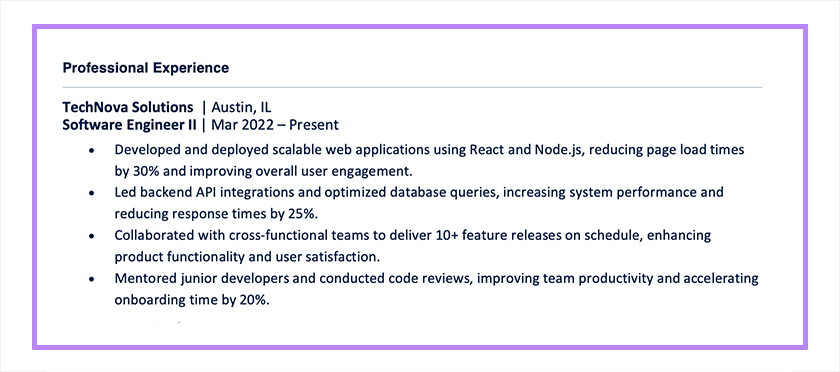
This is the core of the chronological resume format. List your most recent job first, followed by previous roles in descending order. For each position, include your job title, company name, employment dates, and 3–5 bullet points focused on achievements.
Use action verbs and quantify results whenever possible. Instead of listing duties, show impact—for example, revenue growth, efficiency improvements, or successful projects.
Chronological Resume Experience Example: Bad vs Good
❌ Bad Example (Duties-Focused)
Marketing Assistant
ABC Company | 2022–2024
- Responsible for managing social media accounts on a daily basis
- Helped with planning and executing email marketing campaigns
- Worked on various marketing projects as assigned by the manager
- Assisted the marketing team with daily administrative and operational tasks
Why this is weak:
This example is too vague and focuses only on responsibilities. It doesn’t show impact, achievements, or measurable results, making it less impressive to recruiters and ATS systems.
✅ Good Example (Achievement-Focused)
Marketing Assistant
ABC Company | 2022–2024
- Managed social media accounts, increasing engagement by 45% in 6 months
- Executed email campaigns with an average open rate of 28%, exceeding company benchmarks
- Coordinated 10+ marketing projects, improving campaign delivery time by 20%
- Supported daily marketing operations, contributing to a 15% increase in lead generation
Why this works:
This version uses action verbs, specific achievements, and measurable results. It clearly shows the candidate’s impact and makes the experience more compelling and credible.
Step 4: Add Education
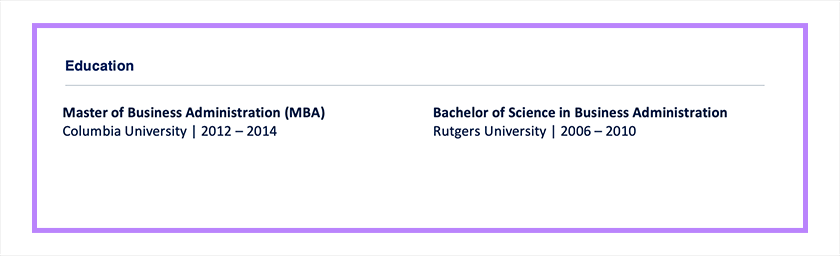
Include your highest degree, institution name, and graduation date. If you’re early in your career, you can add relevant coursework, honors, or academic achievements. For experienced professionals, keep this section concise and place it after work experience.
Step 5: Include Relevant Skills
List skills that align with the job requirements, focusing on both technical and transferable skills. Keep the section concise and avoid overloading it with generic terms. Prioritize skills that are mentioned in the job description to improve ATS compatibility.
Chronological Resume Skills Example: Bad vs Good
❌ Bad Example (Generic & Basic)
- Project Management
- Agile
- Budgeting
- Communication
- Leadership
Why this is weak:
This skills section is too broad and lacks depth. It uses generic terms without context or specialization, making it less impactful and harder for recruiters or ATS to identify specific expertise.
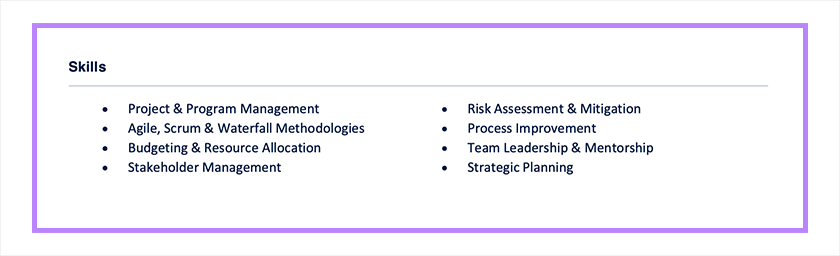
✅ Good Example (Targeted & Comprehensive)
|
|
Why this works:
This skills section is specific, structured, and aligned with senior-level expectations. It includes relevant methodologies, leadership capabilities, and strategic competencies, making it more attractive to recruiters and better optimized for ATS keyword matching.
Step 6: Add Optional Sections
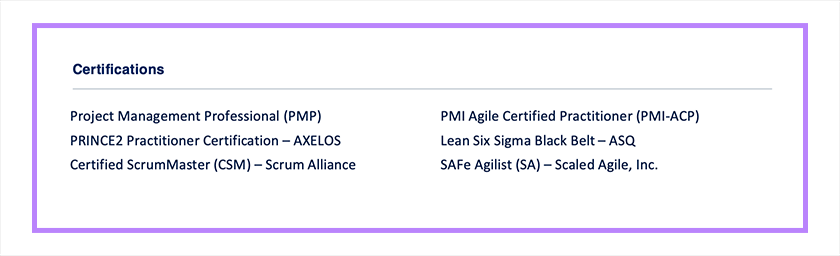
Depending on your background, you can include additional sections such as certifications, projects, volunteer experience, or professional affiliations. These sections can strengthen your profile, especially if they demonstrate relevant expertise or fill gaps in your experience.
Keep optional sections relevant and results-focused to maintain a strong, cohesive resume.
Related: ATS-Friendly Resume Format: Templates & Writing Guide
What Recruiters Actually Look for in a Chronological Resume
From a recruiter’s perspective, the chronological resume format works because it mirrors how hiring decisions are made.
Recruiters don’t read resumes line by line—they scan for:
- Recent job titles
- Career progression
- Measurable results
In most cases, the first thing a recruiter checks is your current or most recent role. If that aligns with the job, they continue reading. If not, they move on.
This is why the chronological resume format consistently performs best—it surfaces your most relevant experience immediately, without forcing recruiters to search for it.
Related:
What Are the Pros and Cons of a Chronological Resume?
The chronological resume format is one of the most widely used and employer-preferred resume styles, but it’s not ideal for every situation. While it works well for candidates with a consistent work history, it may not be the best fit for those with gaps in employment or career changes.
Below, we break down the key advantages and disadvantages of the chronological resume format to help you decide if it’s the right choice for your situation.
| Aspect | ✅ Pros of a Chronological Resume | ❌ Cons of a Chronological Resume |
| Structure & Clarity | Easy to read and widely accepted by employers | Can feel repetitive if roles are similar |
| Career Progression | Clearly shows growth, promotions, and stability | Highlights gaps in employment |
| Recruiter Preference | Preferred by most hiring managers and ATS systems | Less effective for career changers |
| Relevance of Experience | Emphasizes recent and relevant roles first | Older or less relevant roles still take up space |
| Credibility | Demonstrates consistent work history | Job hopping becomes very noticeable |
| Ease of Creation | Simple and straightforward to organize | Harder to highlight transferable skills |
| Best Use Case | Ideal for steady, linear career paths | Not suitable for gaps or frequent career changes |
Chronological Resume Examples
Below are three chronological resume examples tailored to different career stages. Each resume highlights how work experience is presented in reverse-chronological order, with increasing levels of responsibility, impact, and leadership.
Entry-Level Resume Example
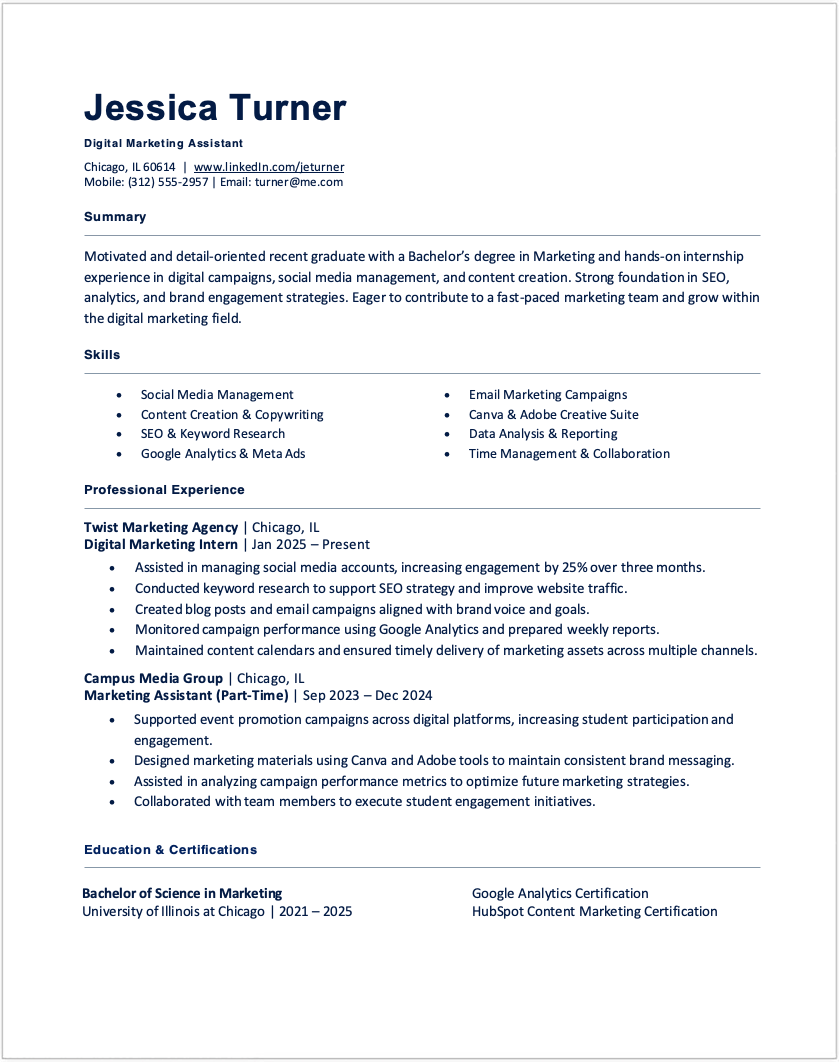
What this example shows:
- Strong use of internships and part-time roles
- Focus on skills, education, and early achievements
- Clear, simple structure suitable for candidates with limited experience
Mid-Level Resume Example
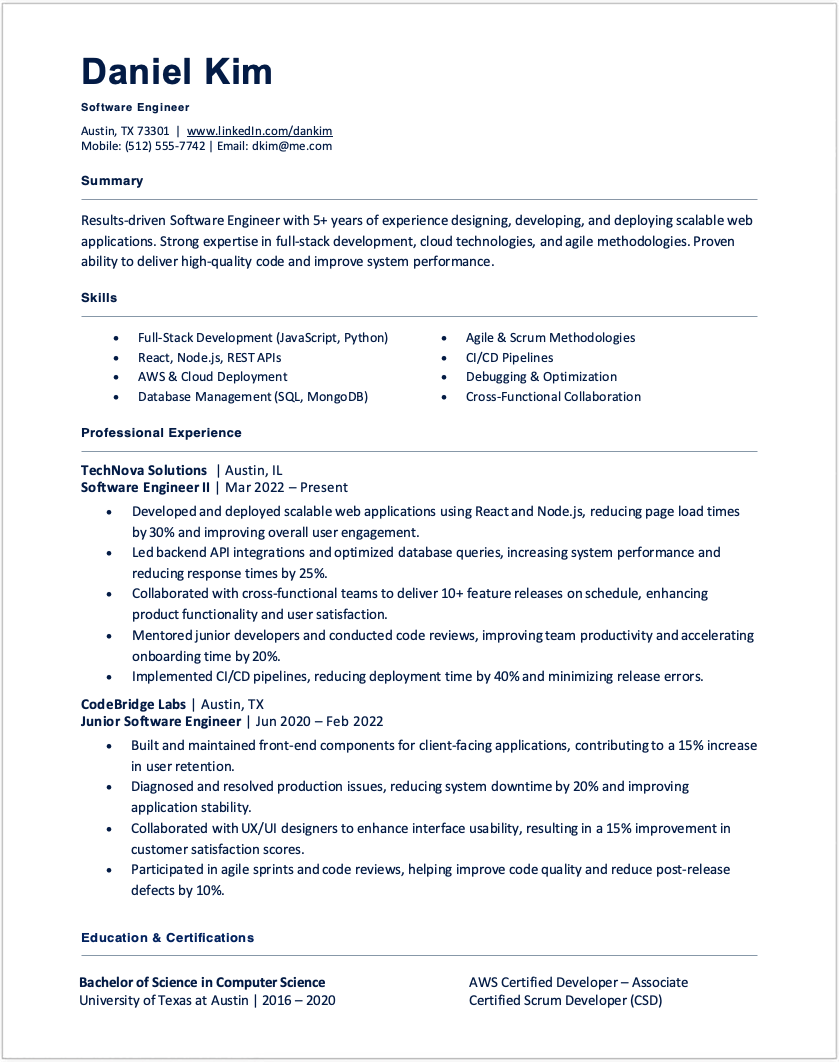
What this example shows:
- Progression from junior to more independent roles
- Measurable achievements and project ownership
- Balanced emphasis on technical skills and results
Senior-Level Resume Example
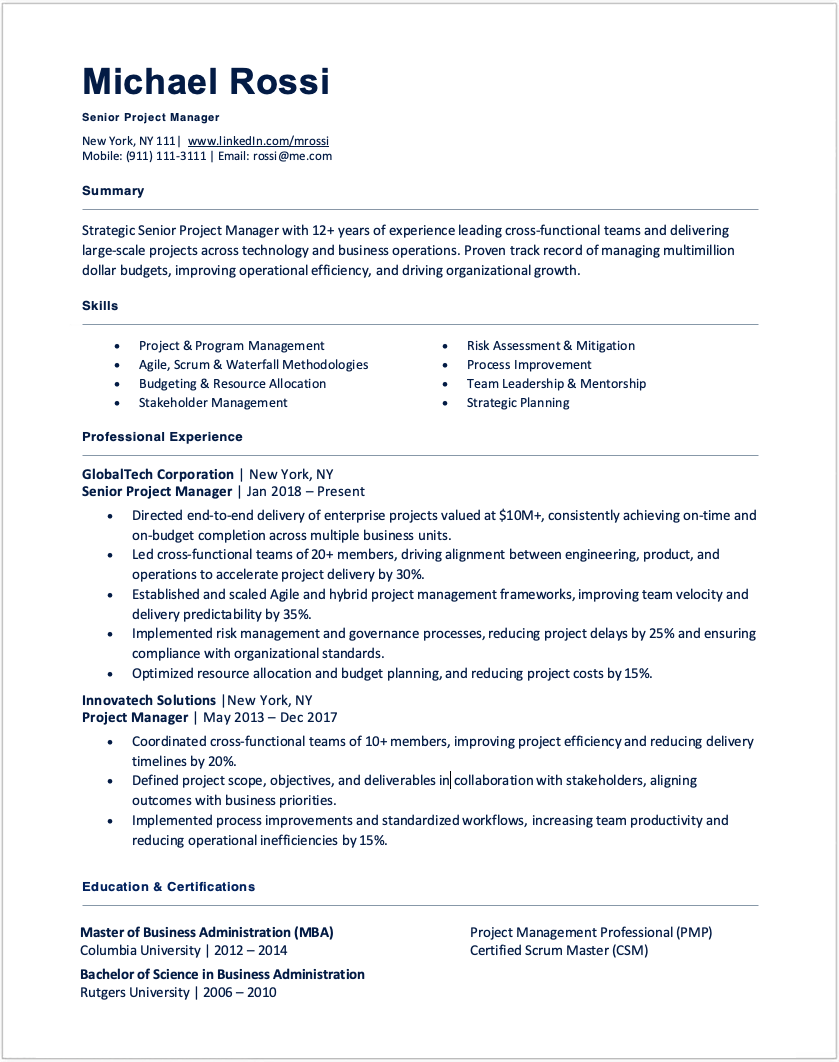
What this example shows:
- Leadership, strategy, and business impact
- Quantifiable results (budget, teams, performance improvements)
- Clear career progression and executive-level responsibilities
These examples demonstrate how a chronological resume evolves with experience—making it one of the most effective formats for showcasing career growth.
Hiring Reality: A strong job title + measurable result will always outperform a long list of responsibilities.
Related: Resume Tips to Make Your Job Application Stand Out
Chronological Resume Templates
Download professionally designed chronological resume templates tailored for experienced professionals across industries. These examples help you highlight key skills and relevant experience in a clear, modern format. Choose a template below and customize it to match your background and career goals.
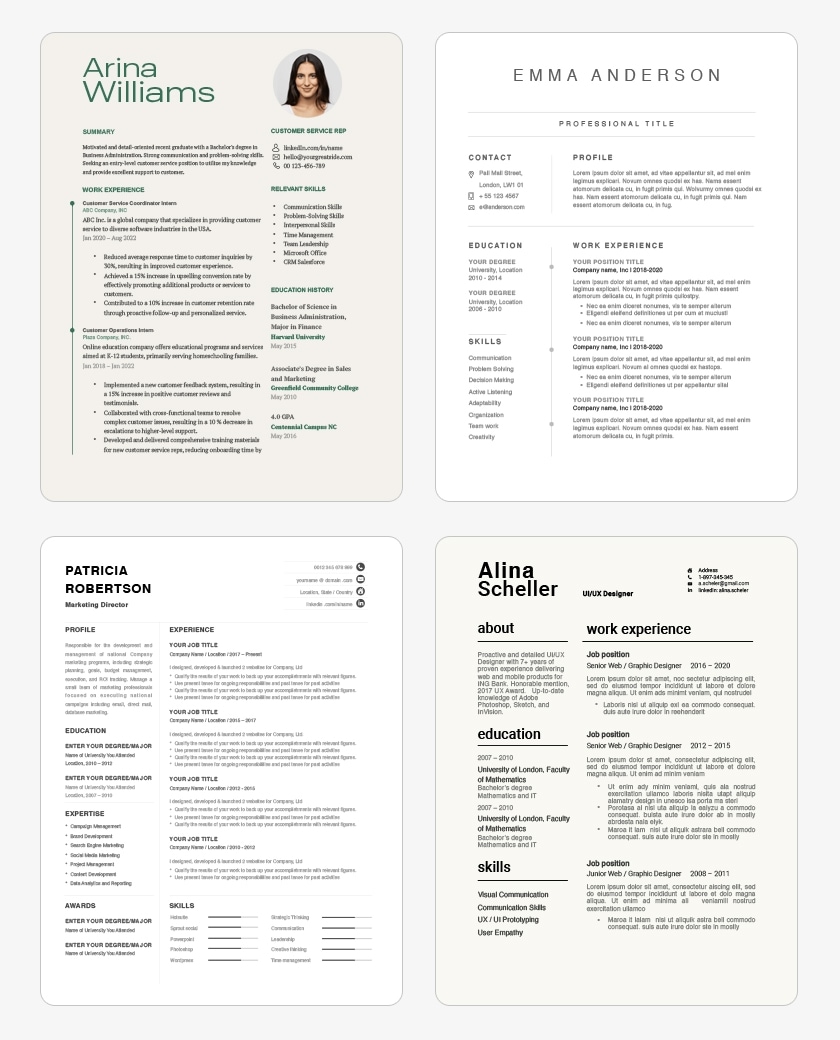
Chronological Resume Templates
Download it here →
Free Chronological Resume Template
Description:
Ideal for experienced professionals, this template highlights career progression, key skills, and measurable achievements in a clear, structured format.
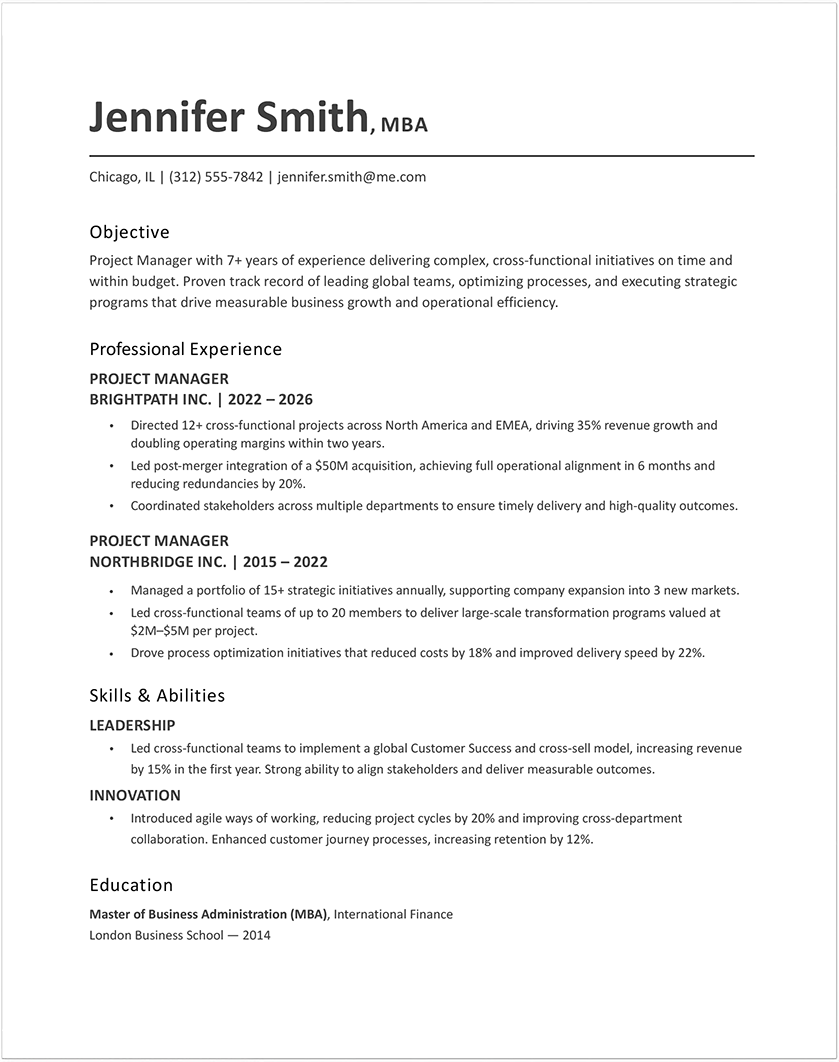
Why This Resume Works:
This chronological format showcases your work history in a logical, easy-to-follow timeline while emphasizing relevant skills and accomplishments. It helps hiring managers quickly understand your experience level and growth over time, while also remaining highly ATS-friendly.
Free Chronological Resume Template MS Word
Download it here →
Copy and paste this chronological resume template to create a clear, ATS-friendly resume organized by your most recent work experience.
[Full Name]
[City, State] | [Email Address] | [LinkedIn URL] | [Phone Number]
PROFESSIONAL SUMMARY
————————————————
[Write 2–3 lines summarizing your experience, key achievements, and career focus. Emphasize your years of experience and main strengths.]
EXPERIENCE
————————————————
[Most Recent Job Title] | [Company Name] | [City, State] | [Month Year – Present]
– [Key achievement with measurable result]
– [Responsibility or accomplishment]
– [Responsibility or accomplishment]
[Previous Job Title] | [Company Name] | [City, State] | [Month Year – Month Year]
– [Key achievement or responsibility]
– [Key achievement or responsibility]
[Earlier Job Title] | [Company Name] | [City, State] | [Month Year – Month Year]
– [Key achievement or responsibility]
– [Key achievement or responsibility]
EDUCATION
————————————————
[Degree] | [University Name] | [City, State] | [Graduation Year]
SKILLS
————————————————
– [Skill 1] | [Skill 2] | [Skill 3] | [Skill 4]
– [Skill 5] | [Skill 6]
CERTIFICATIONS (Optional)
————————————————
– [Certification Name] | [Organization] | [Year]
– [Certification Name] | [Organization] | [Year]
Chronological Resume vs Other Resume Formats
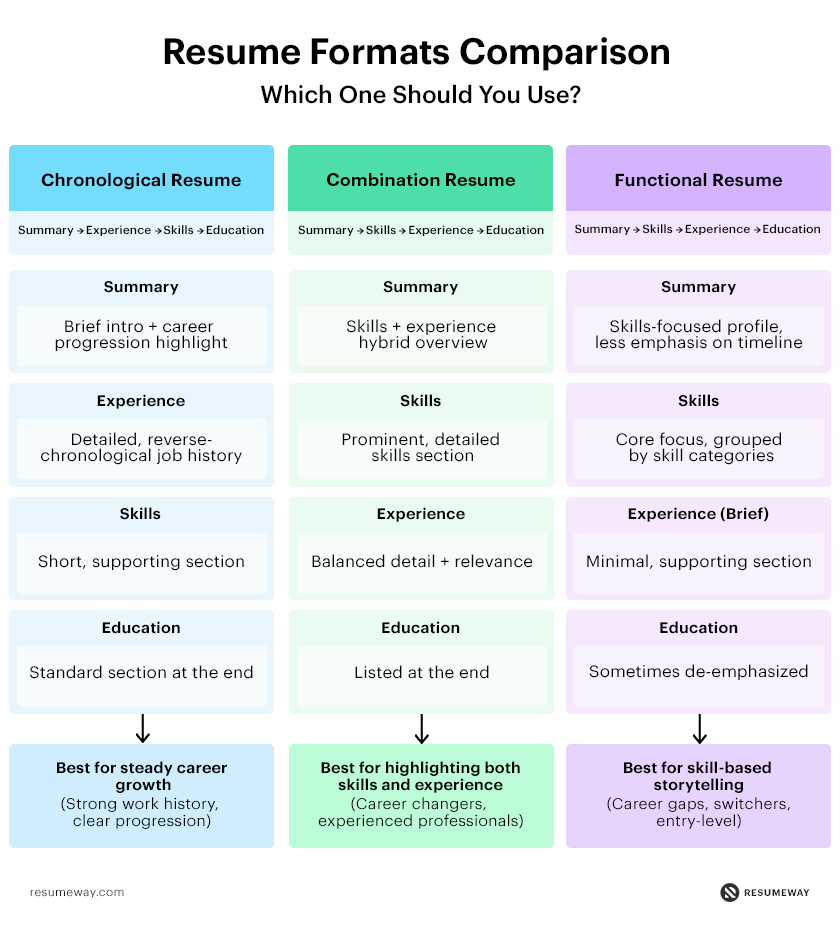
Choosing the right resume format can make a big difference in how employers view your application. While the chronological resume format is the most traditional and widely accepted, other formats focus more on skills or combine both approaches.
The table below compares the key differences to help you quickly identify which format best fits your experience and career goals.
| Feature | Chronological Resume | Functional Resume | Combination Resume |
| Focus | Work history in reverse order | Skills and abilities | Skills + work history |
| Best for | People with steady career progression | Career changers, gaps in employment | Experienced professionals with strong skills |
| Experience section | Central and detailed | Minimal or de-emphasized | Present but secondary to skills |
| Skills section | Brief or supporting role | Main section | Prominent and detailed |
| Order of sections | Experience → Skills → Education | Skills → Summary → Experience | Skills → Experience → Education |
| Highlights | Job titles, employers, dates | Competencies and achievements | Both skills and career progression |
| Downsides | Shows employment gaps clearly | Can look vague or lack context | Can become repetitive or longer |
| ATS | Very ATS-friendly | Sometimes less ATS-friendly | ATS-friendly if well structured |
| Ideal industries | Traditional fields (finance, law, education) | Creative or non-linear careers | Tech, management, specialized roles |
Which Resume Format Should You Choose?
For most job seekers, the chronological resume remains the safest and most effective option because it clearly demonstrates career progression and aligns with employer expectations. However, if you’re changing careers, re-entering the workforce, or have significant employment gaps, another format may better showcase your qualifications.
Learn more about each format:
- Chronological Resume Format – Best for showcasing steady career growth.
- Combination Resume Format – Ideal for highlighting both skills and work experience.
- Functional Resume Format – Focuses on transferable skills and qualifications rather than employment history.
FAQ
Is a chronological resume format good for ATS?
Yes, a chronological resume format is highly ATS-friendly because it follows a clear structure with standard sections like work experience, education, and skills. Its reverse-chronological layout makes it easy for applicant tracking systems to scan and rank your resume based on relevant keywords.
Can you use a chronological resume with employment gaps?
Yes, you can still use a chronological resume format if you have employment gaps, but you should address them briefly(e.g., freelance work, courses, or personal projects). If gaps are significant, consider combining it with elements of a combination resume format.
What is the best file format for a chronological resume?
The best file format is usually PDF, as it preserves formatting across devices and systems. However, if a job posting specifically requests it, you may need to submit your chronological resume in Word (.docx) format for ATS compatibility.
Can students use a chronological resume format?
Yes, students can use a chronological resume format, especially if they have relevant experience such as internships, part-time jobs, volunteer work, or academic projects. It helps present a clear timeline and shows how their experience has developed over time, even at an early stage.
Popular related posts:
- 130+ Hobbies and Interests for a Resume (Examples & Guide)
- How To Write a Cover Letter With No Experience
- 13 Frequently Asked Questions About Cover Letters
- How to Fix Your Resume: Tips Before Applying for a Job
- Resume Summary Writing Guide: Examples and Tips
- How Long Should a Resume Be in 2026?
 Privacy Protected
Get a Free Expert Resume Review
file here or click to upload
Thank You